of course! nice catch, will be fixed in the next build. I also have some swiss-related fixes to do... but I expected it'd take several iterations
Myracle GUI
Moderator: Ras
-
mar
- Posts: 2953
- Joined: Fri Nov 26, 2010 2:00 pm
- Location: Czech Republic
- Full name: Martin Sedlak
Re: Myracle GUI
-
mar
- Posts: 2953
- Joined: Fri Nov 26, 2010 2:00 pm
- Location: Czech Republic
- Full name: Martin Sedlak
Re: Myracle GUI
build 108 is up:
- fix: swiss sorting for subsequent rounds honors crosstable tiebreakers
- fix: swiss tries to enforce max 2 of the same color in a row, if not possible rules get relaxed
- fix: unloading analysis engines unchecks analysis in menu
- number of boards in game overview can be changed in appearance settings now
- fix: swiss sorting for subsequent rounds honors crosstable tiebreakers
- fix: swiss tries to enforce max 2 of the same color in a row, if not possible rules get relaxed
- fix: unloading analysis engines unchecks analysis in menu
- number of boards in game overview can be changed in appearance settings now
-
PHILOCHESS

- Posts: 30
- Joined: Tue Mar 24, 2020 8:56 am
- Location: Lima, Peru
- Full name: Robert M. Cuadros
Re: Myracle GUI
I hadn’t checked the forum for a few days, so it was a nice surprise to find so many updates. Thanks a lot, Martin! The new Swiss tournament option is very welcome, especially the inclusion of Buchholz and Sonneborn-Berger tiebreaks. The options for sorting and reordering engines and choosing the tournament output path are also very useful.
Eternal happiness does not exist. Only happy moments do.
-
mar
- Posts: 2953
- Joined: Fri Nov 26, 2010 2:00 pm
- Location: Czech Republic
- Full name: Martin Sedlak
Re: Myracle GUI
build 109 is up:
- fix: stopping analysis clears arrows (as it should)
- engine unload now distributed among job system worker threads instead of clogging unload queue;
resulting in much faster tournament stop/abort and also basically eliminates scheduler stalls when playing very fast (like 1sec) games
- fix: stopping analysis clears arrows (as it should)
- engine unload now distributed among job system worker threads instead of clogging unload queue;
resulting in much faster tournament stop/abort and also basically eliminates scheduler stalls when playing very fast (like 1sec) games
-
PHILOCHESS
- Posts: 30
- Joined: Tue Mar 24, 2020 8:56 am
- Location: Lima, Peru
- Full name: Robert M. Cuadros
Re: Myracle GUI
Hi Martin,
I am currently reviewing Myracle’s draw-related rules and adjudication settings. I would appreciate your clarification on two points:
1. Time forfeit when checkmate is impossible
When an engine loses on time, does Myracle check whether its opponent could deliver checkmate by any possible series of legal moves, in accordance with FIDE Article 6.9?
If so, does Myracle analyze the exact position, or does it use a material-based rule or some other practical approximation?
2. Move count adjudication
Could you please explain precisely how the two values under `Move count adjudication` are applied? For example, with settings of `160 moves` and `50 cp`:
- Does Myracle begin checking the evaluation condition as soon as move 160 is reached?
- Must the evaluations reported by both engines be within ±50 cp, or is only the most recently reported evaluation considered?
- What happens if one engine’s evaluation is within that range but the other engine’s evaluation is not?
- Is the game adjudicated immediately upon reaching move 160 if the evaluation condition is satisfied, or can it also be adjudicated at any later move once that condition is met?
Thank you very much for your help.
I am currently reviewing Myracle’s draw-related rules and adjudication settings. I would appreciate your clarification on two points:
1. Time forfeit when checkmate is impossible
When an engine loses on time, does Myracle check whether its opponent could deliver checkmate by any possible series of legal moves, in accordance with FIDE Article 6.9?
If so, does Myracle analyze the exact position, or does it use a material-based rule or some other practical approximation?
2. Move count adjudication
Could you please explain precisely how the two values under `Move count adjudication` are applied? For example, with settings of `160 moves` and `50 cp`:
- Does Myracle begin checking the evaluation condition as soon as move 160 is reached?
- Must the evaluations reported by both engines be within ±50 cp, or is only the most recently reported evaluation considered?
- What happens if one engine’s evaluation is within that range but the other engine’s evaluation is not?
- Is the game adjudicated immediately upon reaching move 160 if the evaluation condition is satisfied, or can it also be adjudicated at any later move once that condition is met?
Thank you very much for your help.
Eternal happiness does not exist. Only happy moments do.
-
mar
- Posts: 2953
- Joined: Fri Nov 26, 2010 2:00 pm
- Location: Czech Republic
- Full name: Martin Sedlak
Re: Myracle GUI
I originally wanted to, but since it's quite tricky, in the end I don't do that. after all, engines can move orders of magnitudePHILOCHESS wrote: ↑Wed Jul 29, 2026 10:44 pm 1. Time forfeit when checkmate is impossible
When an engine loses on time, does Myracle check whether its opponent could deliver checkmate by any possible series of legal moves, in accordance with FIDE Article 6.9?
If so, does Myracle analyze the exact position, or does it use a material-based rule or some other practical approximation?
faster than humans, so time forfeits are unforgiving.
it's also possible to set extra time margin in time control settings if needed. FIDE rules are good, but designed for humans.
another possibility is to replay games with time forfeits or post-filter time forfeits.
still I think it's better if engine authors fix their time management instead; even though there is always some extra overhead in GUI <-> engine communication, it should be milliseconds at most
both must be met; so once it's move 160 (or later), if absolute score value is <=50 cp (last score), it's adjudicated2. Move count adjudication
Could you please explain precisely how the two values under `Move count adjudication` are applied? For example, with settings of `160 moves` and `50 cp`:
- Does Myracle begin checking the evaluation condition as soon as move 160 is reached?
- Must the evaluations reported by both engines be within ±50 cp, or is only the most recently reported evaluation considered?
- What happens if one engine’s evaluation is within that range but the other engine’s evaluation is not?
- Is the game adjudicated immediately upon reaching move 160 if the evaluation condition is satisfied, or can it also be adjudicated at any later move once that condition is met?
as movecount-based draw (so either engine must be <=50 cp at the time of the check).
now that I think about it, perhaps it would be better if both engines would agree, but then it wouldn't work in human-eng games which is probably fine
-
mar
- Posts: 2953
- Joined: Fri Nov 26, 2010 2:00 pm
- Location: Czech Republic
- Full name: Martin Sedlak
Re: Myracle GUI
having given it some more thought, I'll keep the movecount adjudication as is: the margin is for either engine
once move limit is reached; the purpose is to cutoff a game at certain move if it's too long. often (for weaker engines) it happens
that some engine completely misevaluates the endgame, trying to win a dead draw.
if both engine scores were checked then the movecount adjudication would never trigger in this case; so I'll keep it as is.
hope it helps
once move limit is reached; the purpose is to cutoff a game at certain move if it's too long. often (for weaker engines) it happens
that some engine completely misevaluates the endgame, trying to win a dead draw.
if both engine scores were checked then the movecount adjudication would never trigger in this case; so I'll keep it as is.
hope it helps
-
PHILOCHESS
- Posts: 30
- Joined: Tue Mar 24, 2020 8:56 am
- Location: Lima, Peru
- Full name: Robert M. Cuadros
Re: Myracle GUI
Thank you very much for your detailed answers, Martin. They have clarified these points and will help me take some important details into account when setting up my engine tests and interpreting their results. I really appreciate your time and assistance.
Eternal happiness does not exist. Only happy moments do.
-
Ipmanchess
- Posts: 12
- Joined: Tue Sep 07, 2021 12:55 pm
- Full name: Jean-Paul Vael
Re: Myracle GUI
Hi Martin,
I think i have put a issue-request about 7-8years ago on Cutechess Gui Github about Time Forfeits.
As engine tester it would save a lot time if we could see these Time Forfeits (TF) in real time!
When you run 1000 & 1000 games and i would see in for example first 100 games a few TF ,then i could stop the test
before i have to wait when testings are finished..and to check these games for TF afterward.
If these TF could be placed in My Tournament result screen that i open during these tests would be great!
Kind regards,
Ipman.
I think i have put a issue-request about 7-8years ago on Cutechess Gui Github about Time Forfeits.
As engine tester it would save a lot time if we could see these Time Forfeits (TF) in real time!
When you run 1000 & 1000 games and i would see in for example first 100 games a few TF ,then i could stop the test
before i have to wait when testings are finished..and to check these games for TF afterward.
If these TF could be placed in My Tournament result screen that i open during these tests would be great!
Kind regards,
Ipman.
-
mar
- Posts: 2953
- Joined: Fri Nov 26, 2010 2:00 pm
- Location: Czech Republic
- Full name: Martin Sedlak
Re: Myracle GUI
hi Ipman,Ipmanchess wrote: ↑Thu Jul 30, 2026 11:26 am Hi Martin,
I think i have put a issue-request about 7-8years ago on Cutechess Gui Github about Time Forfeits.
As engine tester it would save a lot time if we could see these Time Forfeits (TF) in real time!
When you run 1000 & 1000 games and i would see in for example first 100 games a few TF ,then i could stop the test
before i have to wait when testings are finished..and to check these games for TF afterward.
If these TF could be placed in My Tournament result screen that i open during these tests would be great!
myracle already supports this, I call them "anomalies", an anomaly is a time loss, a disconnect (crash) and illegal move
they are shown in the tournament tab in schedule in red (optionally also in crosstable):
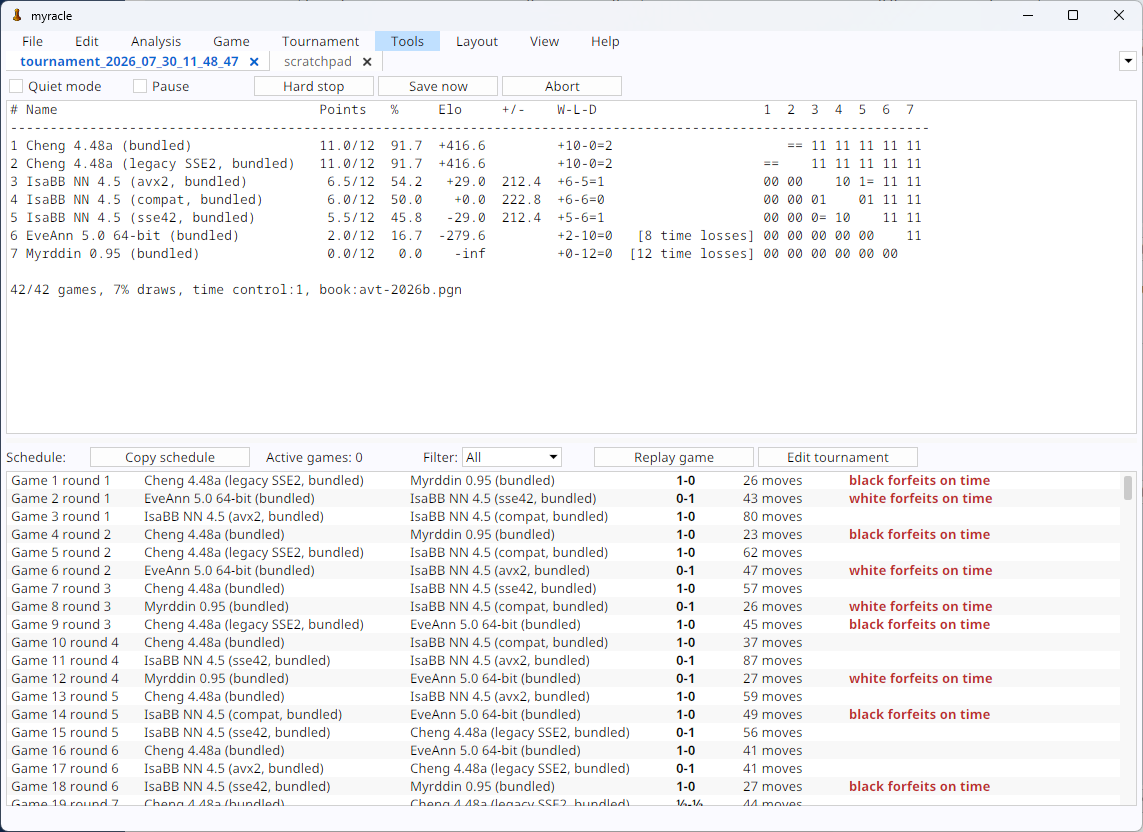
additionaly a filter can be set to only show anomalies:
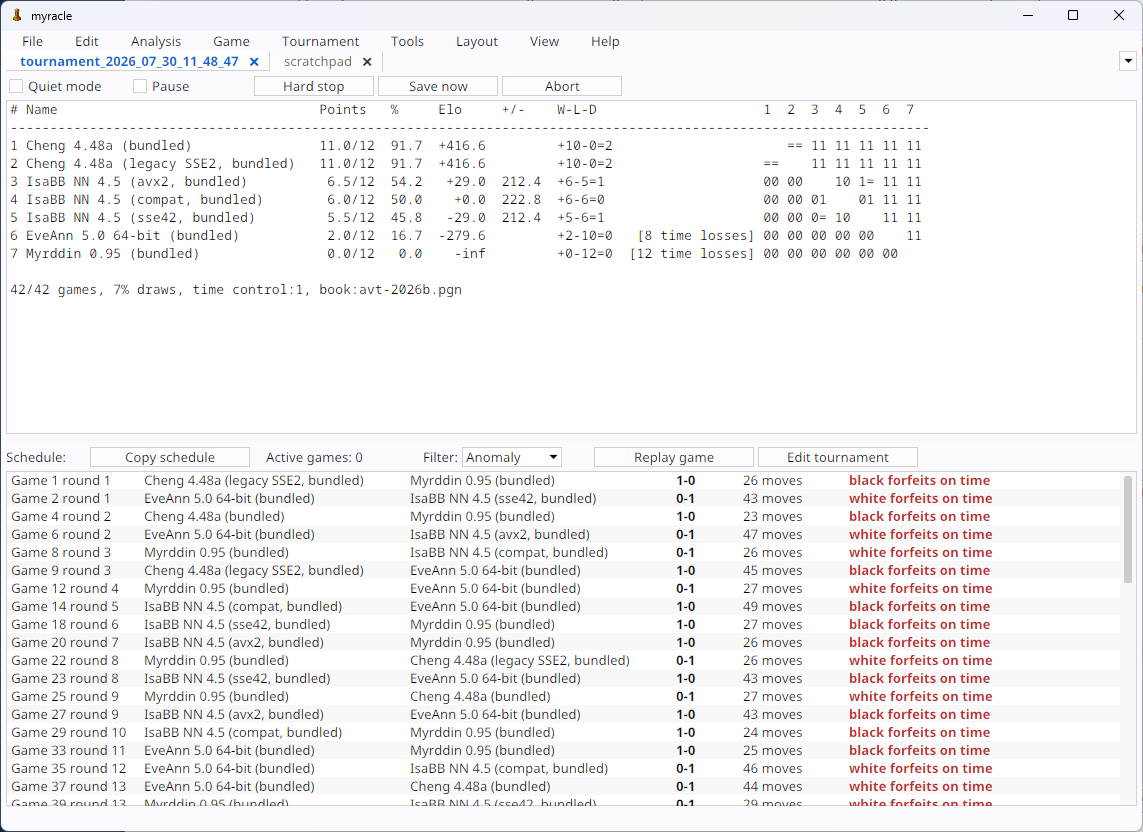
if anomalies occur, a detailed log will be saved along with the pgn and tournament file including last 4k lines of engine<->GUI communication and timestamp, invaluable for engine developers and debugging in general.
this is done automatically and has no additional performance impact, only anomalies are logged and people don't have to dig through gigabytes of log files