Hello,
and I am asking for help in installing the engine Bagatur 3.3. When starting the window with the program, I still have this message:
Failed to Java VM. I've already tried installing Java a few times but nothing helped.
Bagatur 3.3 - problem
Moderator: Ras
-
Wolfgang
- Posts: 989
- Joined: Sat May 13, 2006 1:08 am
Re: Bagatur 3.3 - problem
Read https://github.com/bagaturchess/Bagatur, there is a detailed description what to do, rather simple btw.
Your questions are quite boring
Wolfgang
Your questions are quite boring

Wolfgang
-
Krzysztof Grzelak
- Posts: 1603
- Joined: Tue Jul 15, 2014 12:47 pm
Re: Bagatur 3.3 - problem
Thank you, but it also gives nothing.Wolfgang wrote: ↑Wed Jun 01, 2022 9:58 pm Read https://github.com/bagaturchess/Bagatur, there is a detailed description what to do, rather simple btw.
Your questions are quite boring
Wolfgang
-
Sylwy

- Posts: 5079
- Joined: Fri Apr 21, 2006 4:19 pm
- Location: IAȘI - the historical capital of MOLDOVA
- Full name: Silvian Rucsandescu
Re: Bagatur 3.3 - problem
1.-Ensure that the Java Runtime Environment (JRE) 1.8 or later is installed on your computer (it should be the case nowadays but if not, have in mind that JRE is required, only JDK doesn't work). It could be downloaded from java.comKrzysztof Grzelak wrote: ↑Wed Jun 01, 2022 8:27 pm Hello,
and I am asking for help in installing the engine Bagatur 3.3. When starting the window with the program, I still have this message:
Failed to Java VM. I've already tried installing Java a few times but nothing helped.
2.-Unpack this distribution somewhere (Arena has a sub-folder called 'engines', you can extract it there). ATTENTION -do not delete anything from the folder generated by archive unless you are familiar with Java-written engines!

-
Wolfgang
- Posts: 989
- Joined: Sat May 13, 2006 1:08 am
Re: Bagatur 3.3 - problem
As I said, quite simple.
But only if one reads the documentation as you did, Krystof apparantly did not
But only if one reads the documentation as you did, Krystof apparantly did not

-
cc2150dx
- Posts: 447
- Joined: Sat Nov 30, 2013 9:51 am
- Full name: Jason Coombs
Re: Bagatur 3.3 - problem
@Krzysztof You must have the 32-bit version of Java installed (that's why the error message). The link https://www.java.com/en/download/ provided by (Sylwy) is the 64-bit version of Java; which should work.
-
Krzysztof Grzelak
- Posts: 1603
- Joined: Tue Jul 15, 2014 12:47 pm
Re: Bagatur 3.3 - problem
Thanks for all the answers. I have Java 1.8 x64 bit installed. I have a message like in the picture.
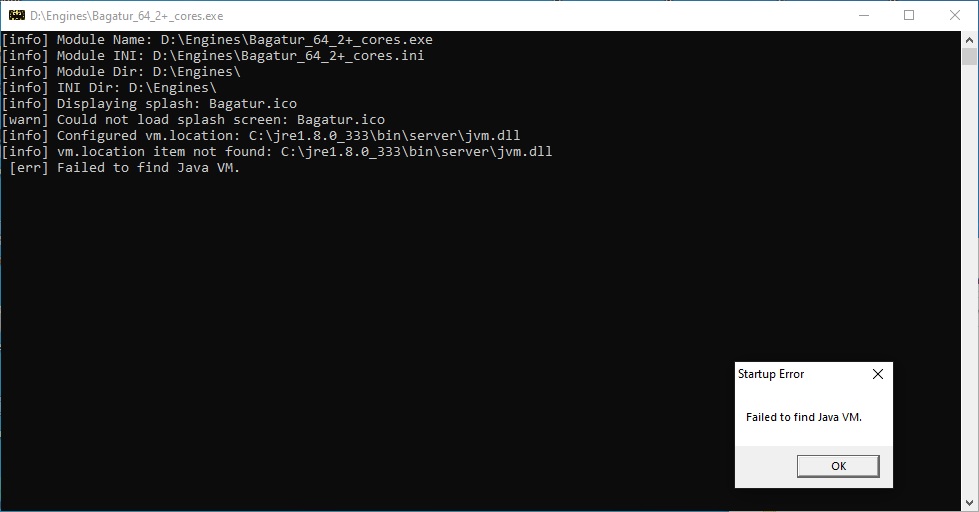
I will try to install Jave 32 bit.
I will try to install Jave 32 bit.
-
Krzysztof Grzelak
- Posts: 1603
- Joined: Tue Jul 15, 2014 12:47 pm
Re: Bagatur 3.3 - problem
I have installed Java 32 bit, the same thing happens and the same message.
-
Guenther
- Posts: 4718
- Joined: Wed Oct 01, 2008 6:33 am
- Location: Regensburg, Germany
- Full name: Guenther Simon
Re: Bagatur 3.3 - problem
It seems what you configured in the ini file for Bagatur does not exist at all.Krzysztof Grzelak wrote: ↑Fri Jun 03, 2022 1:52 pm I have installed Java 32 bit, the same thing happens and the same message.
Code: Select all
C:\jre\1.8.0_333\bin\server\jvm.dllhttps://github.com/bagaturchess/Bagatur/issues/6
-
Gabor Szots

- Posts: 1517
- Joined: Sat Jul 21, 2018 7:43 am
- Location: Budapest, Hungary
- Full name: Gabor Szots
Re: Bagatur 3.3 - problem
In your Bagatur directory you'll find ini files with this line:
vm.location=c:\Program Files\Java\jdk-17.0.2\bin\server\jvm.dll
Initially this line is out of use, there is a semicolon at the beginning of the line. Remove the semicolon and edit the line to point to your jvm.dll. The line above is how it looks on my PC.
vm.location=c:\Program Files\Java\jdk-17.0.2\bin\server\jvm.dll
Initially this line is out of use, there is a semicolon at the beginning of the line. Remove the semicolon and edit the line to point to your jvm.dll. The line above is how it looks on my PC.
Gabor Szots
CCRL testing group
CCRL testing group