phhnguyen wrote: ↑Sat Apr 11, 2020 8:21 am
Thanks for the report. Can you tell more about that bug? Details? How to view and reproduce the bug?
add a current game to the book with youre gui and than open the book and folow the moves and you wont see the casteling
move 0-0 or e1g1 or e8g8 in the book engine stop on this position and take to think and than it play any move and than
back in book when it will play the casteling move
phhnguyen wrote: ↑Sat Apr 11, 2020 8:21 am
Thanks for the report. Can you tell more about that bug? Details? How to view and reproduce the bug?
add a current game to the book with youre gui and than open the book and folow the moves and you wont see the casteling
move 0-0 or e1g1 or e8g8 in the book engine stop on this position and take to think and than it play any move and than
back in book when it will play the casteling move
Thank you very much for the report.
However, I could not reproduce the problem. I started with opening book fruit.bin (you can download it via menu->tools->Download). Fig1 shown that there was no move 6) ... e5 when the game has. Fig 2 is that book after adding and you can see e5 and some castling moves.
Fig 1: there is not move 6) ... e5
Fig 2: now the book has 6) ... e5 and some castling moves
Can you check that? How to reproduce (step by step)? Thanks
https://banksiagui.com
The most features chess GUI, based on opensource Banksia - the chess tournament manager
MCDermont wrote: ↑Sun Apr 12, 2020 9:21 pm
how can i post here any picture like you do ?
You need to upload your pictures into some servers/online services thus other people can access them to view. There are so many free ones. In my case I use https://imgur.com/. After loading images into that website, it will give you a short text named BBCode. Just copy and paste it in your reply box and that is all.
https://banksiagui.com
The most features chess GUI, based on opensource Banksia - the chess tournament manager
Nordlandia wrote: ↑Sun Apr 12, 2020 7:53 am
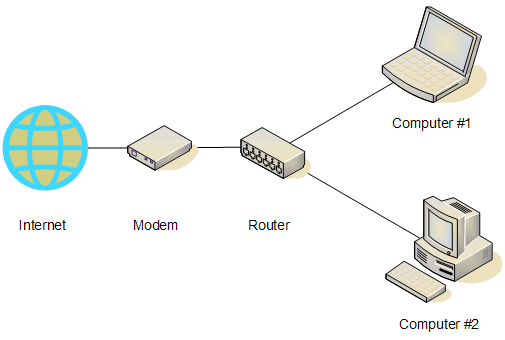
Picture one -> This is the idea. Connect two computers directly using crossover cable
Picture two -> This is the current way it is implemented
Is the direct communication with crossover cable idea better?
I guess it should be the fastest and safest. It is also very convenient if you have already a short crossover cable and two computers sitting next to each other (thus you don't need to layout long cables). Otherwise, the "normal" way (using WIFI, routers) is more convenient and good enough.
https://banksiagui.com
The most features chess GUI, based on opensource Banksia - the chess tournament manager
phhnguyen: is it doable to give support for it. I do think as shorter the cable the better (two computers sitting next to each other as close as possible).
Nordlandia wrote: ↑Mon Apr 13, 2020 7:27 am
phhnguyen: is it doable to give support for it. I do think as shorter the cable the better (two computers sitting next to each other as close as possible).
Maybe put on to-do-list if feasible.
Yes, it is doable and already. By using a crossover cable (some network adapters even accept normal cables) to connect two computers, you actually create a Local Area Network (LAN) without a router. Just configure them after connecting. There are many topics about that (e.g., this link https://smallbusiness.chron.com/hook-up ... 37280.html).
Once the LAN between those computers is established, BSG can run tournaments over them.
For me, I prefer the "standard" way to connect all my computers to a LAN, using WIFI and a router thus I can use them to search the Internet and work as usual when they (the number may excess 2) are playing tournaments.
https://banksiagui.com
The most features chess GUI, based on opensource Banksia - the chess tournament manager
MCDermont wrote: ↑Sun Apr 12, 2020 8:15 am
Thanks for the report. Can you tell more about that bug? Details? How to view and reproduce the bug?
add a current game to the book with youre gui and than open the book and folow the moves and you wont see the casteling
move 0-0 or e1g1 or e8g8 in the book engine stop on this position and take to think and than it play any move and than
back in book when it will play the casteling move
Thank you very much for the report.
However, I could not reproduce the problem. I started with opening book fruit.bin (you can download it via menu->tools->Download). Fig1 shown that there was no move 6) ... e5 when the game has. Fig 2 is that book after adding and you can see e5 and some castling moves.
Can you check that? How to reproduce (step by step)? Thanks
i did as you wrote here and i did make a small video and you will see i dont have the casteling in my fruit book