Installing some uci-engines in WB X7 - they work via adapter polyglot
Getting stuck with latest Stockfish though - what am i doing wrong here?
Stockfish.ini looks like this; Just doesn't work.
[Polyglot]
EngineName=Stockfish 3.2.1
EngineDir=..\Stockfish
EngineCommand=stockfish-231-64-popcnt-ja
Book=true
BookFile=NaumBook.bin
Log=false
LogFile=
Resign=false
ResignMoves=3
UCIVersion=2
ShowPonder=true
CanPonder=true
SyncStop=false
PromoteWorkAround=false
KibitzMove=false
KibitzPV=false
KibitzCommand=tellall
KibitzDelay=5
[Engine]
Hash=128
Ponder=true
OwnBook=true
BookFile=book.bin
Polyglot
Moderator: Ras
-
Kyodai

- Posts: 325
- Joined: Wed Apr 25, 2012 3:39 pm
Re: Polyglot
Found the source of evil - a missing dot in winboard.ini - like
fd=".\motores
fd=".\motores
-
hgm

- Posts: 28499
- Joined: Fri Mar 10, 2006 10:06 am
- Location: Amsterdam
- Full name: H G Muller
Re: Polyglot
Indeed, that dot alters the meaning completely... 
But I suppose Winboard produced the proper error popup, telling you polyglot.exe could not be found?
But I suppose Winboard produced the proper error popup, telling you polyglot.exe could not be found?
-
Kyodai
- Posts: 325
- Joined: Wed Apr 25, 2012 3:39 pm
Re: Polyglot
Yes, the popups gave good signals but my eyes couldn't register the missing dot at first...
Now I'm wondering how to use books in WB and WB X7 - for uci-engines who don't have their own books and/or own book as an option.
Looks possible via polyglot and f.e use some book.bin and maybe rename it to polyglot.bin if necessary (don't know..) - but the engines somehow
don't seem to react on polycommand like book=true and then specified like book.bin...
This issue is somewhat a mysteri to me - so I welcome all sorts of ideas and knowledge here
Now I'm wondering how to use books in WB and WB X7 - for uci-engines who don't have their own books and/or own book as an option.
Looks possible via polyglot and f.e use some book.bin and maybe rename it to polyglot.bin if necessary (don't know..) - but the engines somehow
don't seem to react on polycommand like book=true and then specified like book.bin...
This issue is somewhat a mysteri to me - so I welcome all sorts of ideas and knowledge here
-
hgm
- Posts: 28499
- Joined: Fri Mar 10, 2006 10:06 am
- Location: Amsterdam
- Full name: H G Muller
Re: Polyglot
What exactly is WB X7?
Polyglot should have options book and bookFile which you have to set to true and a filename, respectively. It could be that you have to set the [engine] option OwnBook to false, however. (Don' t know enough about Polglot for that.
Of course you could also have the engine use the GUI book, specifying it in the Common Engine Options dialog, and be sure the Has Own Book option for the engine is ticked off. Then you are not depedent on Polyglot, so that it also works for WB engines and not only for UCI.
Polyglot should have options book and bookFile which you have to set to true and a filename, respectively. It could be that you have to set the [engine] option OwnBook to false, however. (Don' t know enough about Polglot for that.
Of course you could also have the engine use the GUI book, specifying it in the Common Engine Options dialog, and be sure the Has Own Book option for the engine is ticked off. Then you are not depedent on Polyglot, so that it also works for WB engines and not only for UCI.
-
Kyodai
- Posts: 325
- Joined: Wed Apr 25, 2012 3:39 pm
Re: Polyglot
Thanks for your answer 
WB X7 is Allesandro Scottis inofficial modifications to WB 4.27.
Most of the work was done in 2005-2006. Also there is a nice
Winboard Manager. Picked the latest download from jan-2006
http://www.ascotti.org/programming/chess/winboard_x.htm
Guess I have to try a bit with the polyglot book-options. The
goal is to have WB/Polyglot presenting a sort of interface book handling
also for engines the don't have an own book - or a very small one.
Just like this is possible in Fritz/CB - Shredder and Arena.
WB X7 is Allesandro Scottis inofficial modifications to WB 4.27.
Most of the work was done in 2005-2006. Also there is a nice
Winboard Manager. Picked the latest download from jan-2006
http://www.ascotti.org/programming/chess/winboard_x.htm
Guess I have to try a bit with the polyglot book-options. The
goal is to have WB/Polyglot presenting a sort of interface book handling
also for engines the don't have an own book - or a very small one.
Just like this is possible in Fritz/CB - Shredder and Arena.
-
hgm
- Posts: 28499
- Joined: Fri Mar 10, 2006 10:06 am
- Location: Amsterdam
- Full name: H G Muller
Re: Polyglot
Oh, I never knew that this was called 'X7'. Is there also an X6 etc.?
So why don't you use the WinBoard GUI book then, as in Shredder or Arena?
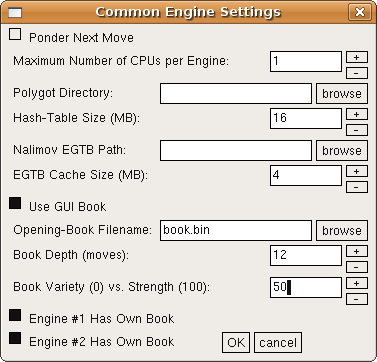
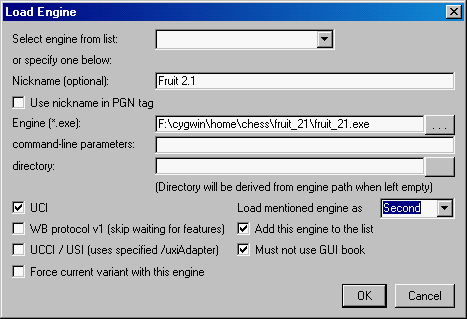
In the Load Engine dialog there is a checkbox that you can untick if you want the engine to use GUI book whenever you load it. (I.e.not start with the default 'Has Own Book'.)
So why don't you use the WinBoard GUI book then, as in Shredder or Arena?
In the Load Engine dialog there is a checkbox that you can untick if you want the engine to use GUI book whenever you load it. (I.e.not start with the default 'Has Own Book'.)
-
Kyodai
- Posts: 325
- Joined: Wed Apr 25, 2012 3:39 pm
Re: Polyglot
ok thanks - these options are not really there in the X7 - on the other hand I have problems with WB and installing uci via polyglot.
Some work fine like the ones below - but there are problems with others - maybe too long and complicated exe names with _ and -.
Below some that works - Critter by changing the name of the exe
Normal engine name for critter is Critter_1.6a_64bit.exe
Are there other ways of writing this that work better? Still this change
for Critter seems to work (renamed the engine to Critter16a)
but there are problems with other engines.
/firstChessProgramNames={"Fairy-Max 4.8" -fcp fmax -fd "..\Fairy-Max" /firstXBook
"Stockfish 2.3.1" -fcp stockfish-231-64-popcnt-ja -fd "../Stockfish" /fUCI
"Critter 1.6a" -fcp Critter16a -fd "../Critter" /fUCI
Some work fine like the ones below - but there are problems with others - maybe too long and complicated exe names with _ and -.
Below some that works - Critter by changing the name of the exe
Normal engine name for critter is Critter_1.6a_64bit.exe
Are there other ways of writing this that work better? Still this change
for Critter seems to work (renamed the engine to Critter16a)
but there are problems with other engines.
/firstChessProgramNames={"Fairy-Max 4.8" -fcp fmax -fd "..\Fairy-Max" /firstXBook
"Stockfish 2.3.1" -fcp stockfish-231-64-popcnt-ja -fd "../Stockfish" /fUCI
"Critter 1.6a" -fcp Critter16a -fd "../Critter" /fUCI
-
hgm
- Posts: 28499
- Joined: Fri Mar 10, 2006 10:06 am
- Location: Amsterdam
- Full name: H G Muller
Re: Polyglot
Normally - or _ in the engine name should not cause any problems. Only spaces do. And this can usually be cured by surrounding the name with quotes. WB should do that automatically when writing them into the ini file.
It is kind of difficult to know what the problem could be if you don't show the things that DON' T work.
It is kind of difficult to know what the problem could be if you don't show the things that DON' T work.
-
Charles Browne
- Posts: 68
- Joined: Sat Jul 07, 2012 3:36 pm
Re: Polyglot
Disclaimer: I'm going by memory on this.Kyodai wrote:/firstChessProgramNames={"Fairy-Max 4.8" -fcp fmax -fd "..\Fairy-Max" /firstXBook
"Stockfish 2.3.1" -fcp stockfish-231-64-popcnt-ja -fd "../Stockfish" /fUCI
"Critter 1.6a" -fcp Critter16a -fd "../Critter" /fUCI
The one thing these names have in common is a 'dot' is in the filename (Fairy-Max 4.8, Stockfish 2.3.1, Critter 1.6a). When a dot is in the filename then the extension .exe has to be included.
/firstChessProgramNames={"Fairy-Max 4.8.exe" -fcp fmax -fd "..\Fairy-Max" /firstXBook
"Stockfish 2.3.1.exe" -fcp stockfish-231-64-popcnt-ja -fd "../Stockfish" /fUCI
"Critter 1.6a.exe" -fcp Critter16a -fd "../Critter" /fUCI
Whether or not that will fix your problem I don't know.
If you haven't already, or if you do not have a particular reason for needing to use Winboard_X, you might want to give H.G. Muller's work with Winboard a try.
http://www.open-aurec.com/wbforum/viewt ... 19&t=51528