I would like to introduce fastchess-gui, a free and open source (MIT) desktop GUI for engine testing, built on fastchess. It does two jobs: telling whether a new version of an engine is stronger than the last one (pick two engines, start an SPRT, follow Elo and LLR as the games come in), and running engine tournaments that resume exactly after any interruption, can be changed while they run and can be broadcast live.
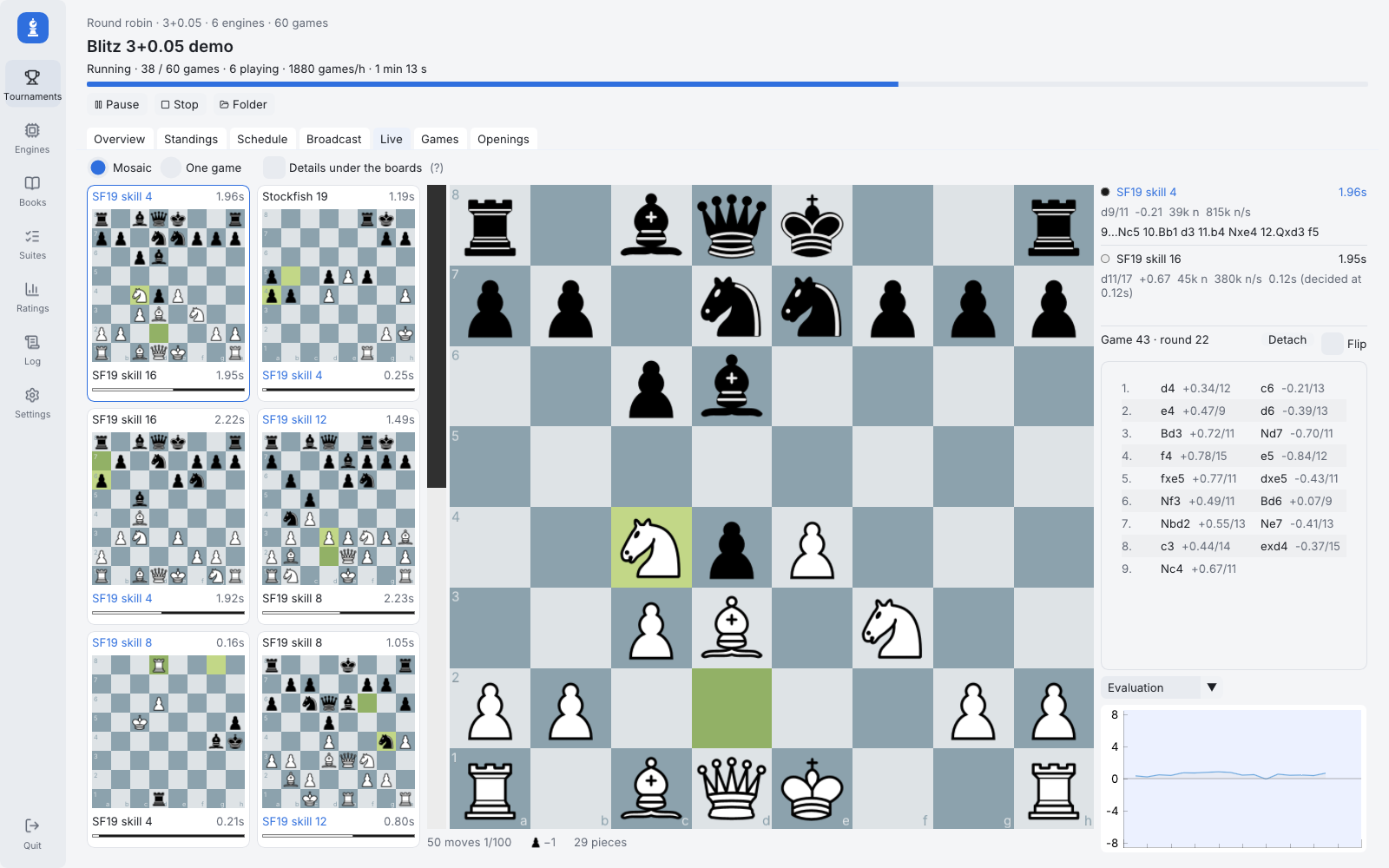
A round robin in progress: every game of the round, and the one followed with the engines' searches, moves and evaluation curve (click for full size).
Why
Many testers still run their tournaments with ChessGUI, which is no longer developed, and many developers run their SPRT tests from the command line. fastchess-gui is meant to serve both, in the spirit of ChessGUI: light, simple, made for long unattended runs, with more features on top. Its goal is to be a tool for testers and engine authors.
David Rabel used the earlier versions to test GaiaChess, and it has grown a lot since.
It is also my small way of saying thank you: seeing one's own engine in the rating lists is a real pleasure, and it only exists thanks to the hours of CPU and the work testers put into it.
Built on fastchess
fastchess-gui is only a layer on top of fastchess: the heavy lifting (running the engines, time control, adjudication, crash recovery, statistics, SPRT) is done by fastchess itself, running inside the GUI, with no command line parsing and no log scraping. The games, the statistics and the SPRT are exactly those of the command line tool, which the same download also contains. A big thank you to its authors and maintainers, Disservin, Szil and PGG106, to gahtan-syarif and to all its contributors: fastchess-gui would not exist without their work.
Light
Less than 7 MB to download, for Windows 10+ and Linux: one executable (plus the fastchess command line tool), no installer, nothing else to install, no runtime. It starts instantly and leaves the CPU to the engines.
Features
Testing a new version
- SPRT matches with fishtest's statistics: Elo, nElo, LOS, pentanomial results, LLR, and a Statistics section with BayesElo, DrawElo, variance ratio and the RMS bias of the openings. Charts of Elo, nElo and LLR over the games, game length, how games ended.
- SPRT calculator, as fishtest's: the chance a test passes and the expected number of games against the true Elo difference. The setup tells how long its bounds are likely to take.
- "Relaunch with..." the next version of an engine against the same opponent, every other setting kept; templates; a queue of tests.
- Test suites (STS, WAC, ERET...): several engines on an EPD file (bm, am, STS points), as a grid with the time to solution, the totals and the STS score, kept to compare versions.
- Formats: round robin (Berger tables, any number of cycles), gauntlet, Swiss, knockout, and the two-engine match (fixed games, until stopped, or SPRT).
- Exact resume: every tournament is a folder with a journal. After a crash, a closed window or a power cut it continues where it stopped, with no game lost or played twice.
- Change a tournament while it runs: add, withdraw or replace an engine, change the number of cycles, replay or void games, with the impact shown before applying.
- Standings: crosstable, maximum likelihood ratings with error bars and an anchor (like Ordo), Sonneborn-Berger or Buchholz, copy as text or BBCode for a forum post, HTML export.
- Time controls: base + increment, moves per period, time per move, fixed nodes or depth, time odds; per engine Hash and Threads, or common settings forced on every engine.
- Chess960, Syzygy adjudication, draw / resign / max moves adjudication, CPU affinity.
- UCI and WinBoard engines (protocol 1 and 2, natively).
- Imports the engine lists of ChessGUI (ChsGUI_Eng.TXT with its options), cutechess, Banksia and Arena, or every engine of a folder.
- A check of each engine (fastchess' UCI compliance steps) and a quick test of 10 games; a missing or rebuilt program is noticed.
- Fair play: the processor time of every engine is measured, with a warning when one uses more cores than its threads or thinks on its opponent's time.
- Wrong PVs marked on their moves, engine logs kept for the games lost on time, by a crash or an illegal move, win/draw/loss shares (UCI_ShowWDL).
- A library of books (EPD, PGN, Polyglot), each checked for illegal positions, duplicates, colour-reversed positions and games already over, browsed on a board and saved cleaned.
- Results by opening: the openings that favour a colour, those always drawn, those that tell the engines apart, exported as EPD.
- Every game with its ECO opening, replayed with its evaluation curve and charts move by move (time and decision time, depth, nodes, speed, PV agreement); filters for the interesting games (evaluation swings, disagreements, games lost from a winning score).
- Two PGN files per tournament (cutechess style, and ChessBase / Lichess style comments), with the engines' Elo in the tags.
- A rating list over every game of every tournament, by time control, group or period, with imported PGN files (CCRL, CEGT...), engine cards, head to head records and the progress of an engine's versions; export for Ordo and BayesElo.
- Broadcast: a TLCS server (for TLCV and node-tlcv / ccrl.live), lichess broadcasts, live PGN + HTML standings + JSON files to upload anywhere, and a built-in web page.
- A headless mode for servers: fastchess-gui --run FOLDER, which can broadcast too.
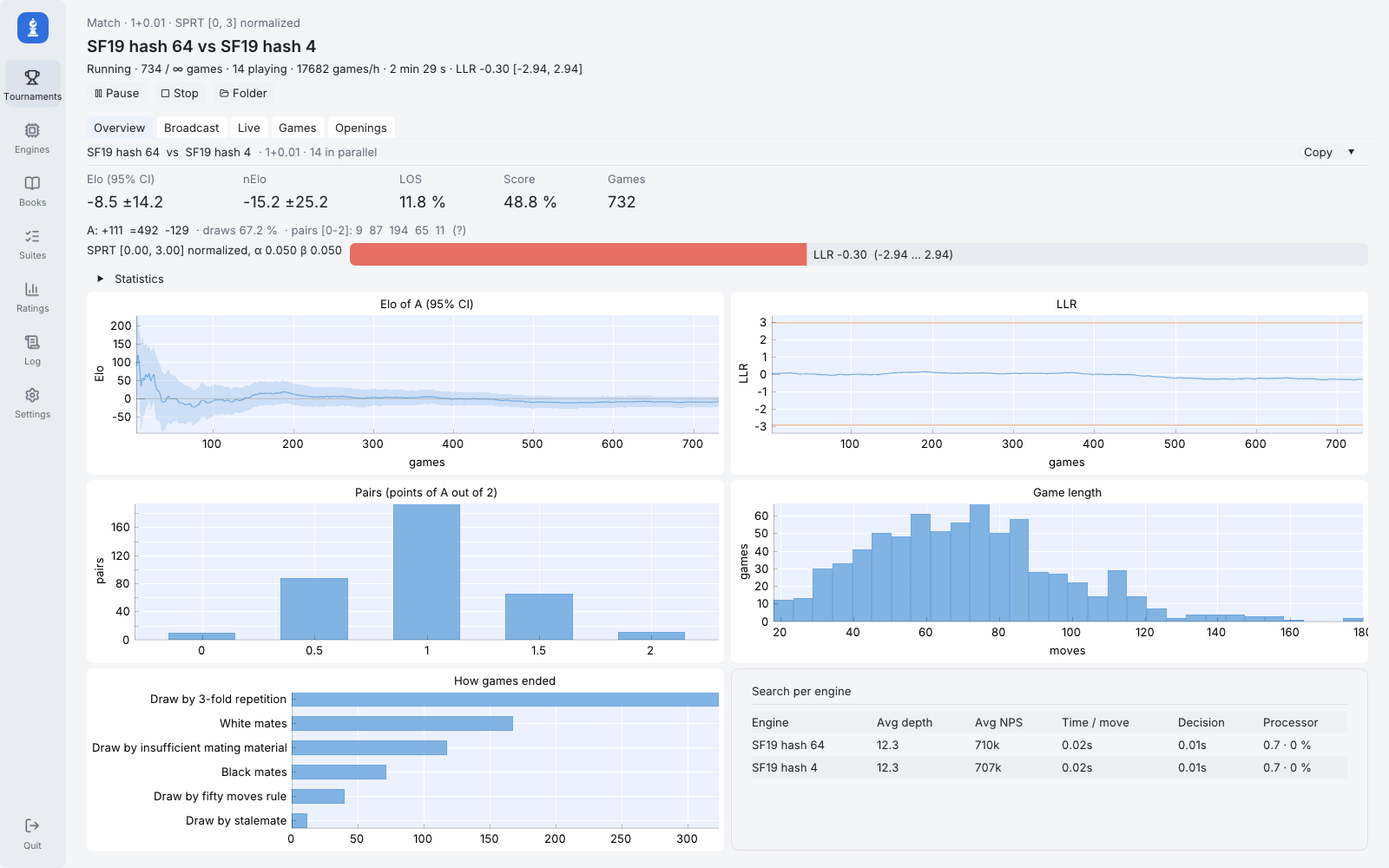
A two-engine SPRT match: Elo and LLR over the games, pairs, game length, how games ended, search per engine.
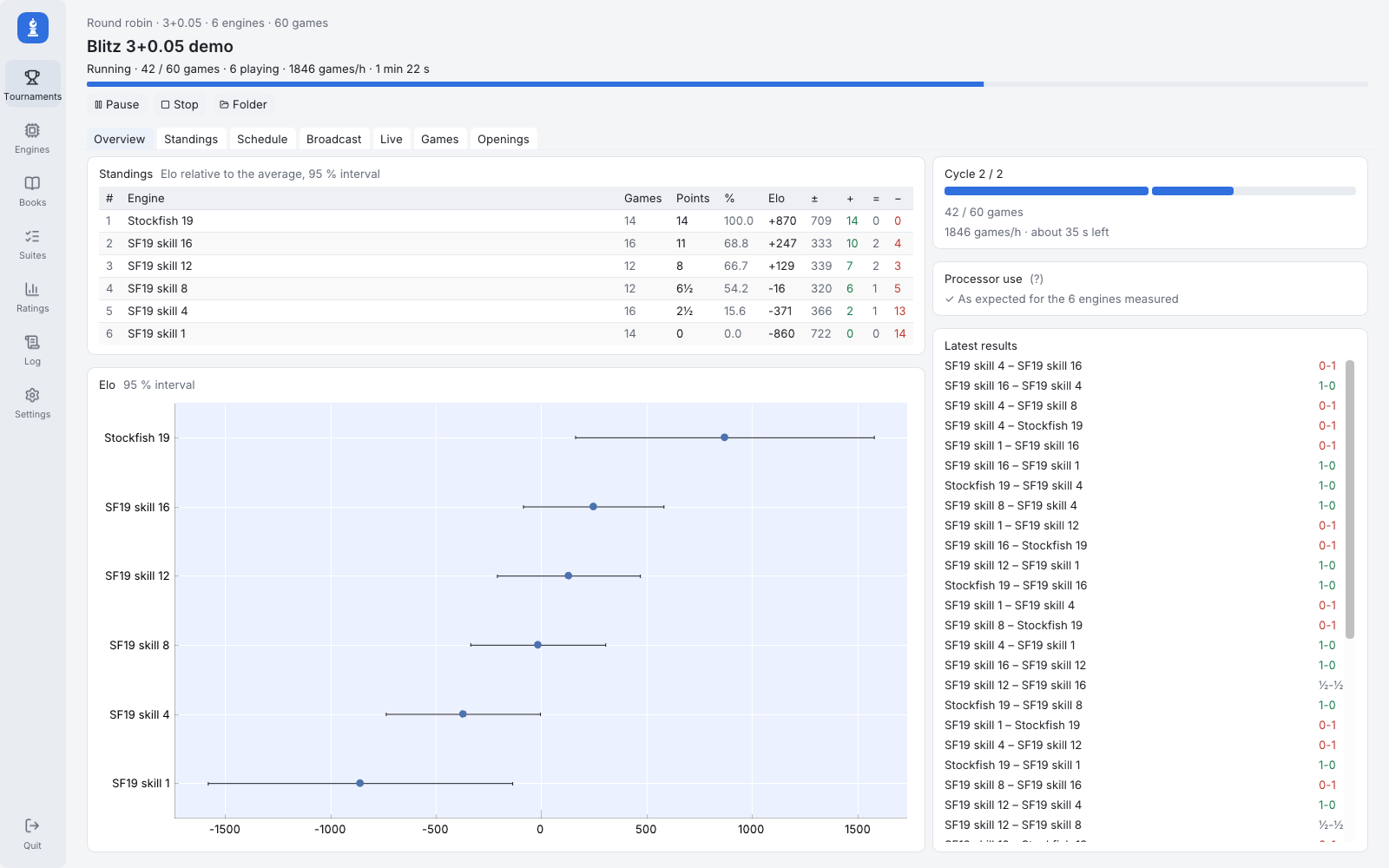
A round robin's overview: standings, ratings with their 95 % intervals, progress, processor use, latest results.
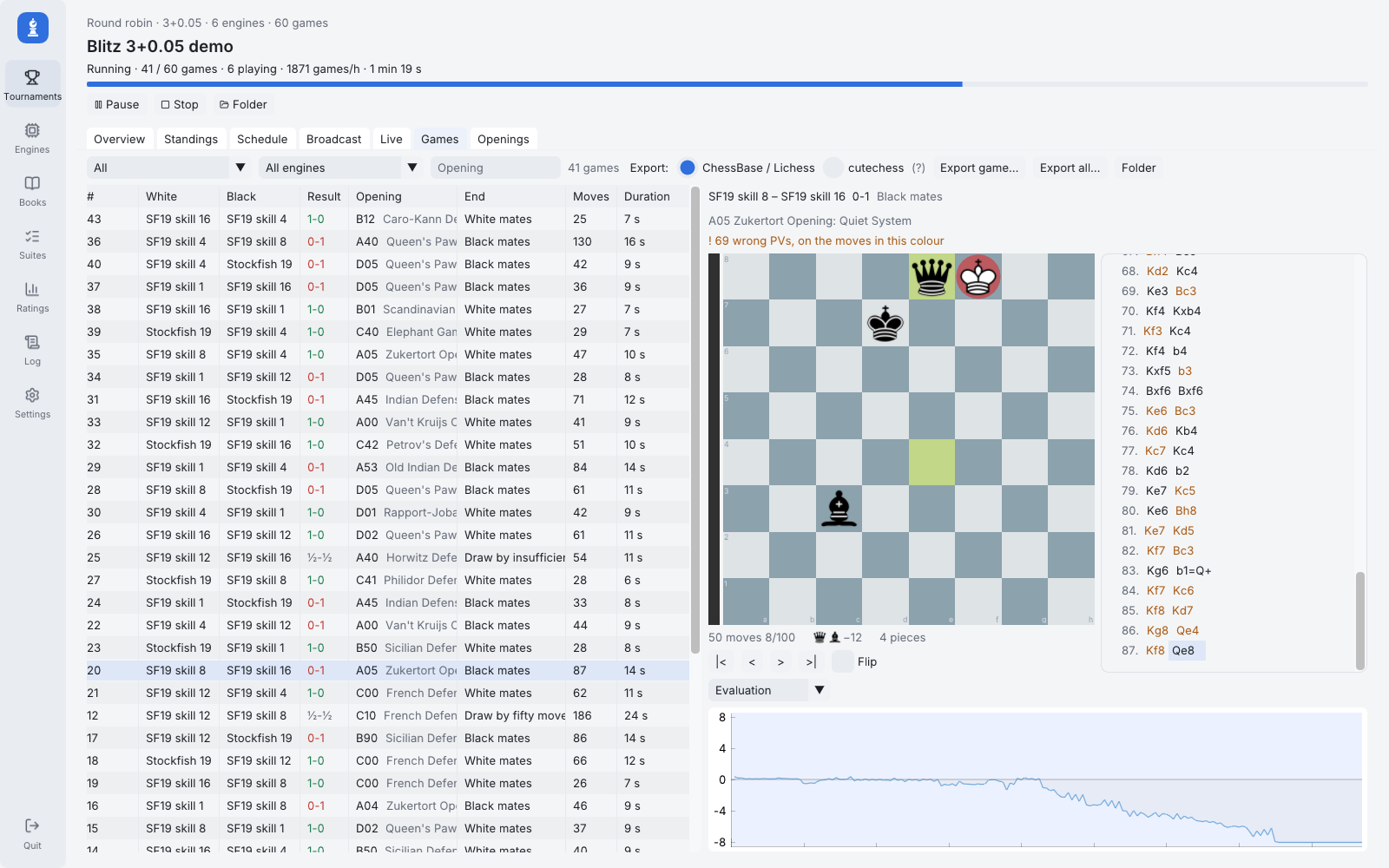
The finished games, with their openings, replay, wrong PVs marked and evaluation curve.
Download
Windows and Linux binaries, sources and the user guide on GitHub: https://github.com/jromang/fastchess-gui
Latest release (0.4.2): https://github.com/jromang/fastchess-gui/releases/latest
Known limitations
- The TLCS server has been tried with node-tlcv, not yet with TLCV itself. If someone can test it, I would be very grateful.
- The Windows version is tested automatically, but has seen little real use so far.
- On Wayland, detached boards stay inside the main window.
Bug reports and feature requests are very welcome, here in this thread or as GitHub issues.
Thanks for reading, and thanks to everyone who tests engines!
Jean-Francois

 And if something is missing for the way you test engines, just ask.


