fastchess-gui: a light GUI for engine testing and tournaments, built on fastchess
Moderator: Ras
-
nmcrazyim5
- Posts: 42
- Joined: Sat Jan 28, 2023 12:03 am
- Full name: P
Re: fastchess-gui: a light GUI for engine testing and tournaments, built on fastchess
Looks great from my brief time playing around with it. Does it compile for Android as ARM is already supported?
-
royb
- Posts: 584
- Joined: Thu Mar 09, 2006 12:53 am
Re: fastchess-gui: a light GUI for engine testing and tournaments, built on fastchess
Just downloaded it on my Macbook. Looks great overall!
Is there a way to, in infinite analysis mode, to prevent the blue arrows being drawn on the board? I find them distracting.
Runs great though so far! Nice job and thanks so much!
Is there a way to, in infinite analysis mode, to prevent the blue arrows being drawn on the board? I find them distracting.
Runs great though so far! Nice job and thanks so much!
-
j_romang
- Posts: 135
- Joined: Mon May 16, 2011 2:52 am
Re: fastchess-gui: a light GUI for engine testing and tournaments, built on fastchess
Fair point, you still have to go through the file dialog to add an engine. For engines on another machine, that's exactly what changes in fastchess-gui 0.6.1, out today: https://github.com/jromang/fastchess-gu ... tag/v0.6.1cpeters wrote: ↑Sun Nov 15, 2026 8:42 pm Yes I know - exactly the point. To add an engine, you will have to click on something first; inserting just a string/command isn't initially possible.
greetings
(the polyglot-workflow was/is just my own ergonomy-thing just for GUIs; it works everytime, else I do prefer scripted headless things)
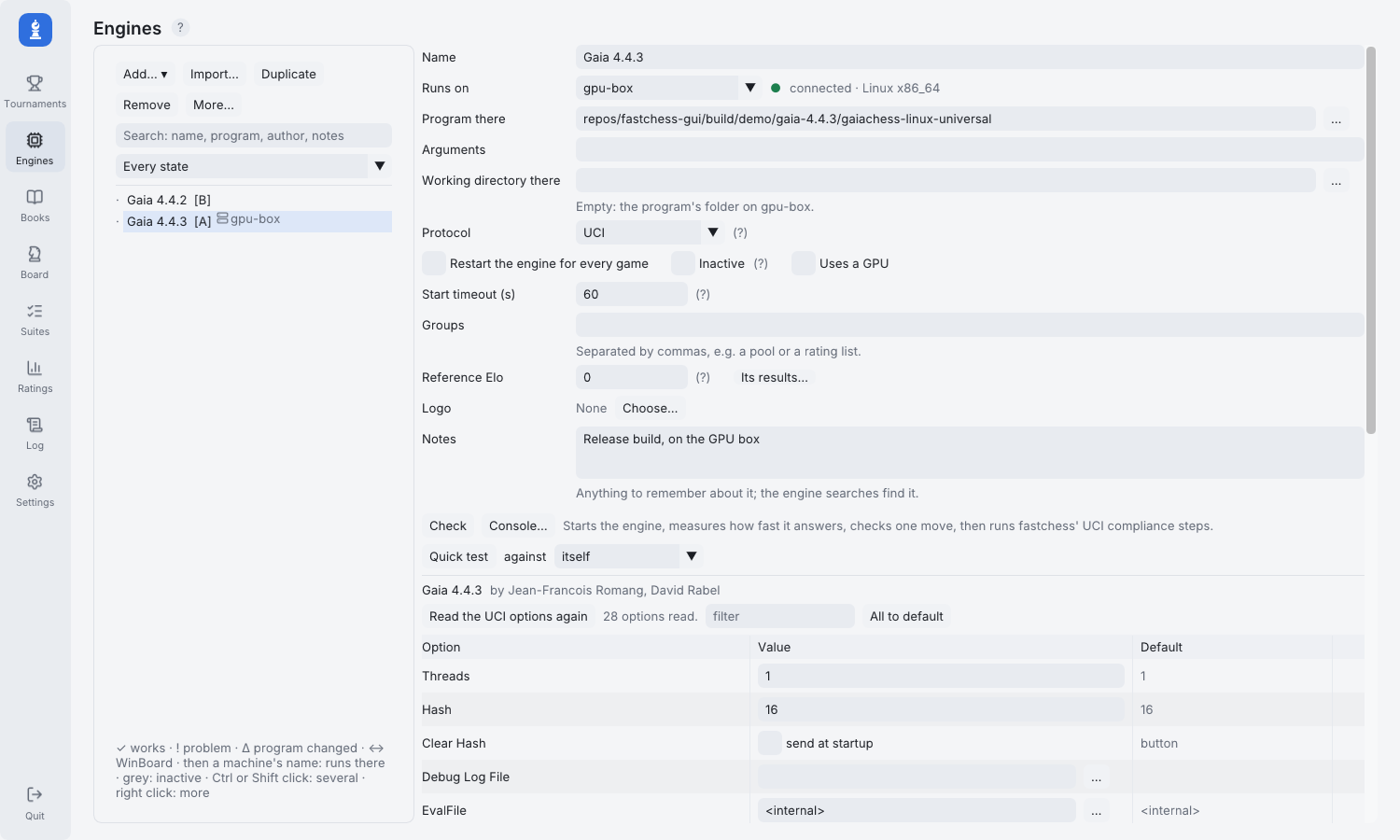
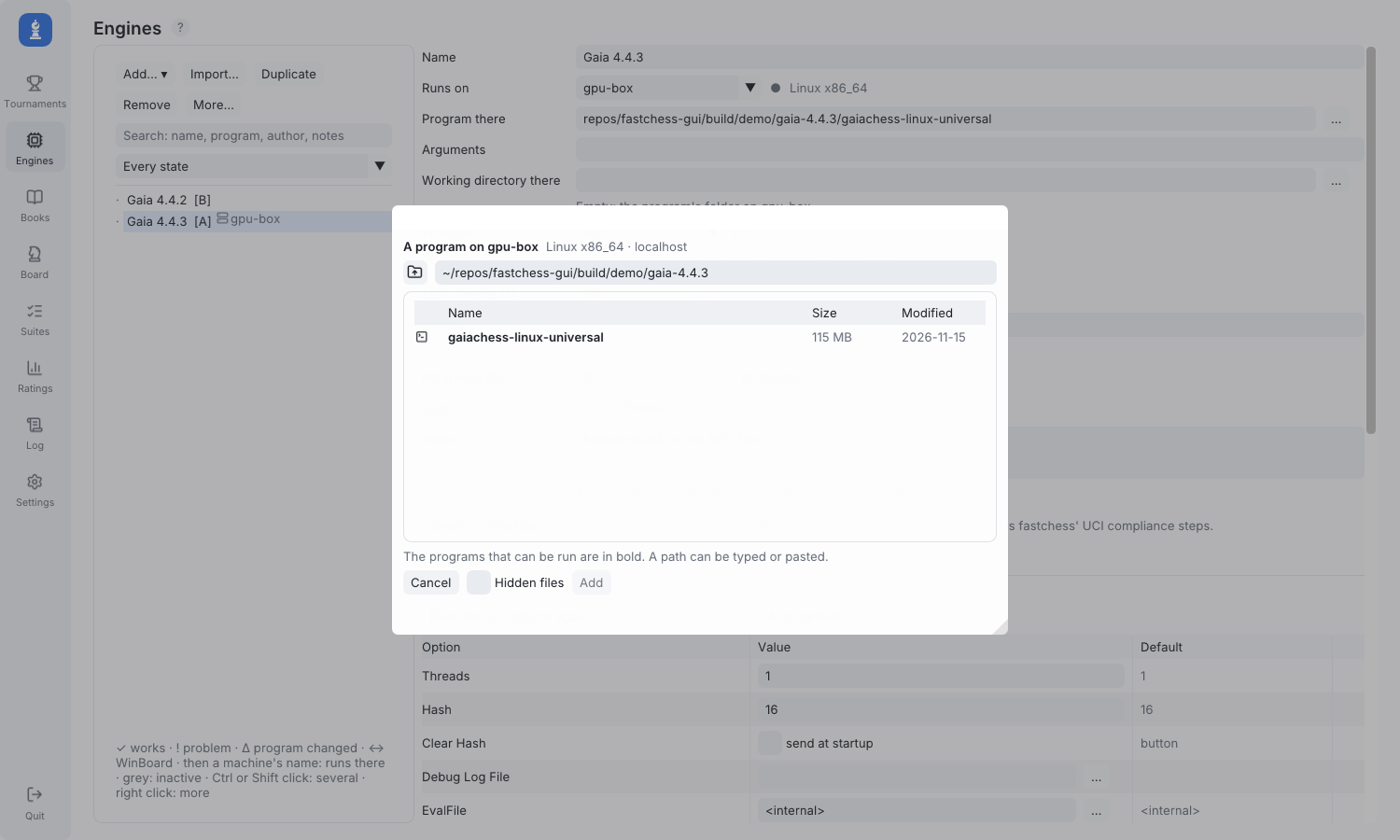
Once the machine is set up in Settings > Machines (host, user, SSH agent or key file, then Test the connection), Engines > Add… offers "A program on <machine>…". It opens a browser of that machine's files, so you can pick the engine there, or simply type or paste its path (~/engines/sf/stockfish works too). No ssh client or polyglot is needed, and nothing has to exist on the local computer. The engine is then read over SSH like a local one, with its name, author and options. On its card, "Runs on" shows where it runs, and Program and Arguments stay plain text fields you can edit afterwards.
In tournaments it behaves like any other engine. Check also measures the round trip to the machine, and the setup summary warns you if that eats noticeably into the increment, with a button to add a time margin. If the connection drops in the middle of a night, the games it cost are voided and replayed, not counted as crashes.
The engine card:
Picking the program on the machine:
Since you prefer scripted headless runs: that works too. fastchess-gui --run SETUP.json plays a tournament without the window, engines on machines included (it uses the SSH agent there), and the engine list is a plain engines.json in the profile, so a remote engine is just an entry with "machine" and its path on that machine, easy to write from a script. The machine only needs to be added and tested once in the window. One thing is still window-only: replaying the games a dropped connection cost.
Thanks again, and let me know how it works with your machines.
-
j_romang
- Posts: 135
- Joined: Mon May 16, 2011 2:52 am
Re: fastchess-gui: a light GUI for engine testing and tournaments, built on fastchess
Thanks a lot, glad it runs well on your MacBook!
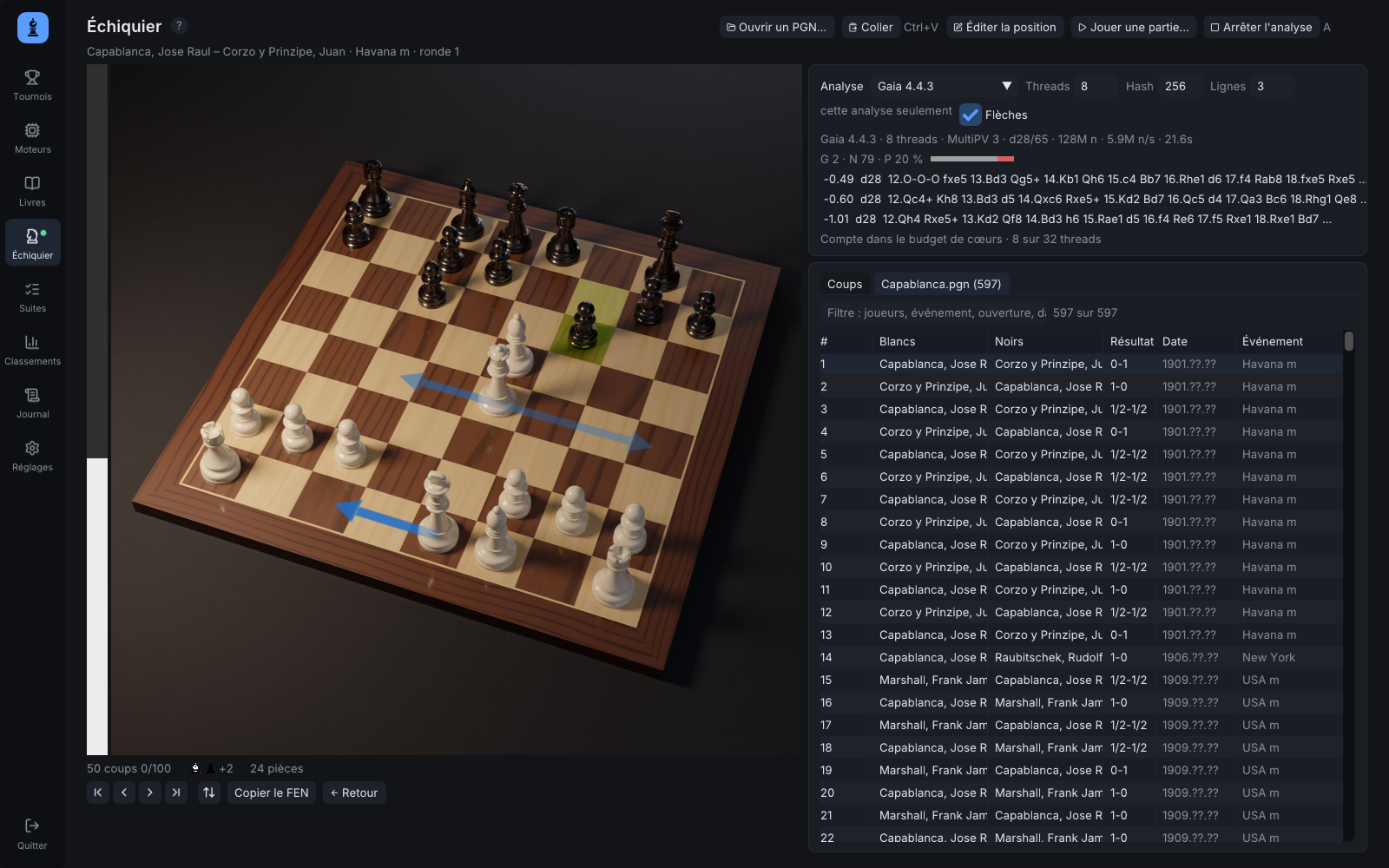
Version 0.6.2 adds an "Arrows" checkbox in the Analysis card of the Board page: untick it and the arrows are gone (in 2D as in 3D), while the engine's lines below still show the moves. The setting is remembered.
I also added an optional 3D view of the board, disabled by default: completely useless, but pretty
 It's real-time path tracing on the graphics card (I had worked on similar projects before): the picture refines in a few seconds while nothing moves, then the GPU rests. To try it, turn it on in Settings > Appearance > 3D board, where there are also a few studio lightings to choose from. Hold the right mouse button to turn around the board, and use the wheel to zoom.
Download: https://github.com/jromang/fastchess-gu ... tag/v0.6.2
-
Nordlandia

- Posts: 2849
- Joined: Fri Sep 25, 2015 9:38 pm
- Location: Sortland, Norway
Re: fastchess-gui: a light GUI for engine testing and tournaments, built on fastchess
Simple request. Would it be possible to lock engine A or B to the white pieces 

-
taychoe
- Posts: 21
- Joined: Wed Jul 02, 2025 6:28 pm
- Full name: Tay Choe
Re: fastchess-gui: a light GUI for engine testing and tournaments, built on fastchess
It's great that like Arena, you also have "Adjudicate draws by tablebase." It's already in fastchess, but then it's not a GUI. I like to see which engines are unable to accomplish elementary checkmates, so I disable adjudication by score. It's quite funny to see a near-3000-rated engine only achieving a draw in a 2Q+K vs K endgame.  At the same time, I don't want an engine to lose on time just because it stumbled into a K+N vs K+N endgame, so I allow the GUI to adjudicate the draw in such cases.
Since you're already showing textures in your 3D board, why not allow bitmaps for the White and Black squares, even for just the main board?

At the same time, I don't want an engine to lose on time just because it stumbled into a K+N vs K+N endgame, so I allow the GUI to adjudicate the draw in such cases. Since you're already showing textures in your 3D board, why not allow bitmaps for the White and Black squares, even for just the main board?
-
j_romang
- Posts: 135
- Joined: Mon May 16, 2011 2:52 am
Re: fastchess-gui: a light GUI for engine testing and tournaments, built on fastchess
Thanks! Not yet. The ARM support is the desktop kind: the macOS build is universal, so it runs natively on Apple silicon. On Linux it should build from source on ARM64, but I only ship x86-64 binaries so far.nmcrazyim5 wrote: ↑Sun Nov 15, 2026 9:12 pm Looks great from my brief time playing around with it. Does it compile for Android as ARM is already supported?
Android is a different matter. SDL3 and Dear ImGui, which the GUI is built on, both run there, so the code itself would port. The obstacles are elsewhere:
- Engines: the GUI starts each engine as a separate process, from a file you pick. Since Android 10, an app that targets a current Android version can't run programs from its own writable storage. DroidFish still does because it targets an older version, which is why it's on F-Droid rather than Google Play. Otherwise engines have to be bundled inside the app.
- The interface is designed for a mouse and a large screen (hover tooltips, right-click, detachable boards, wide tables). A tablet in landscape might be workable; a phone would need a lot rethought.
- Long matches: how well they run depends a lot on the phone. Android kills or freezes apps that use the CPU in the background unless they run a foreground service with a permanent notification, and some phone makers kill even those. Under sustained load, some phones lose half their speed as they heat up, while others barely slow down, so timed matches can be less reliable than on a desktop.
There may be a cheaper route, though. Since 0.6.1 the GUI can run tournaments and engines on another machine over SSH. A build that runs in Termux would turn a phone into one of those machines, driven from the desktop GUI. Would that be useful to you? Or did you have something else in mind, like analysing games on the phone itself?
-
j_romang
- Posts: 135
- Joined: Mon May 16, 2011 2:52 am
Re: fastchess-gui: a light GUI for engine testing and tournaments, built on fastchess
Thanks for the suggestion, it's done and will be in the next release.Nordlandia wrote: ↑Mon Nov 16, 2026 8:14 am Simple request. Would it be possible to lock engine A or B to the white pieces
In a match, the Format row now has a Colours choice next to Fixed games / Infinite / SPRT: Alternate (the default), A always White, or B always White. It's what fastchess' -noswap (and -noswap -reverse) do. It's useful for odds games, where the stronger engine must always have the handicapped side, or to try an opening from one side only.
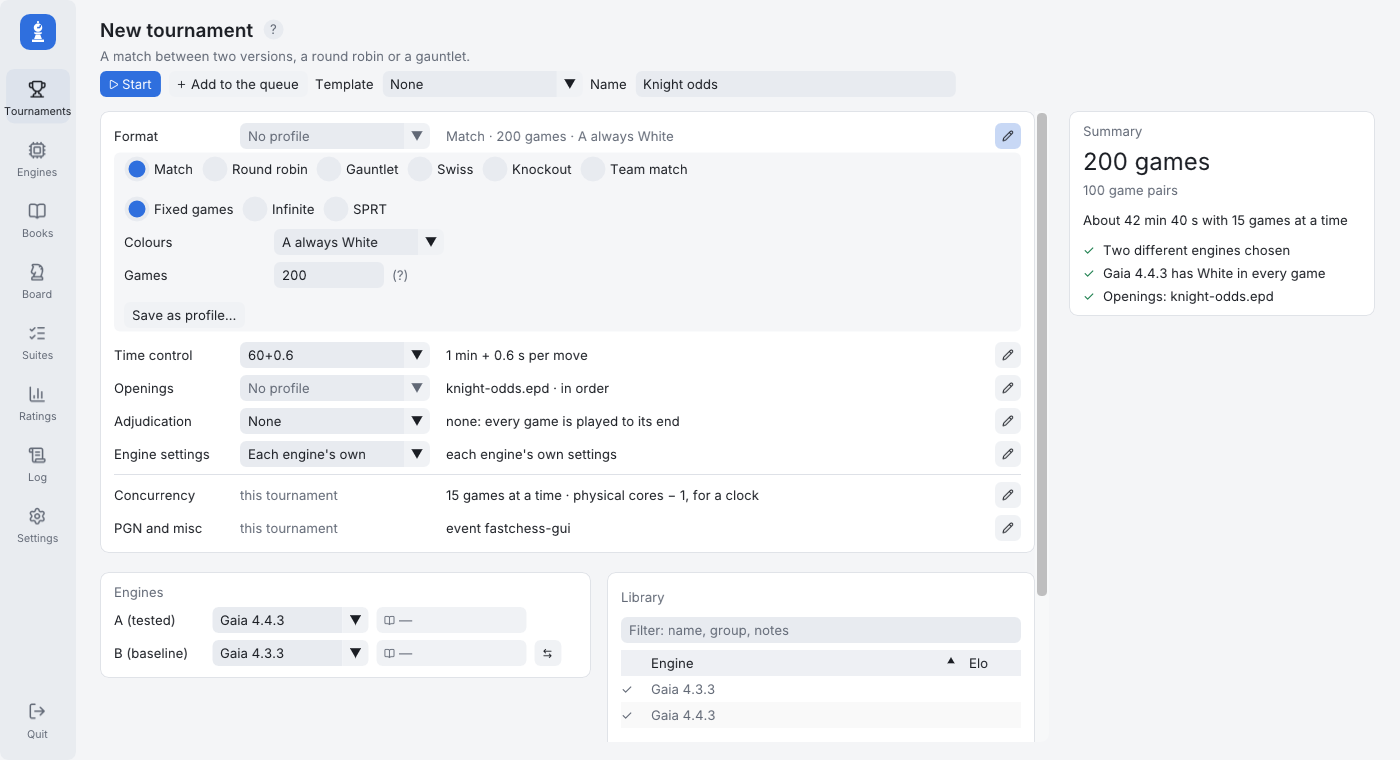
With locked colours, each game takes the next opening of the book, since playing an opening twice with the same colours would add little. The games are still counted in pairs, so the pentanomial statistics and the SPRT work as usual. The score then includes White's advantage, and the RMS bias is no longer shown, since it measures what swapping colours cancels out.
It's for matches only. In round robins, gauntlets and the other formats, colours still alternate.
-
j_romang
- Posts: 135
- Joined: Mon May 16, 2011 2:52 am
Re: fastchess-gui: a light GUI for engine testing and tournaments, built on fastchess
Thanks!taychoe wrote: ↑Mon Nov 16, 2026 8:45 am It's great that like Arena, you also have "Adjudicate draws by tablebase." It's already in fastchess, but then it's not a GUI. I like to see which engines are unable to accomplish elementary checkmates, so I disable adjudication by score. It's quite funny to see a near-3000-rated engine only achieving a draw in a 2Q+K vs K endgame.
Since you're already showing textures in your 3D board, why not allow bitmaps for the White and Black squares, even for just the main board?
About the 3D board: there are no textures in it. The wood is procedural: the path tracer's shader computes it from noise (growth rings, fibres, figure), with each square its own piece of maple or walnut veneer. So there are no bitmaps to reuse for the 2D board, and I'm not planning to add image squares. Settings > Appearance does have colour presets for each theme, and custom colours.

-
j_romang
- Posts: 135
- Joined: Mon May 16, 2011 2:52 am
Re: fastchess-gui: a light GUI for engine testing and tournaments, built on fastchess
fastchess-gui 0.6.3
Hello everyone,
fastchess-gui 0.6.3 is out for Windows, Linux and macOS: release page. This release rebuilds the Board page so that it can read a game, from a tournament or from any PGN.
Under the moves there is now a graph of the game, with the evaluation, each engine's own curve, the marked moves, the phases and the time of each move; the Games tab and the Live view draw the same graph. Analyse the game (G) fills it in a second or two, then searches every position again, four times longer at each pass, up to the time per position you choose. It works from the last position back to the first, which, measured with Gaia and Stockfish, came about 16 % closer to long searches than going forward. Several engines can analyse the same game side by side, each with its curve.
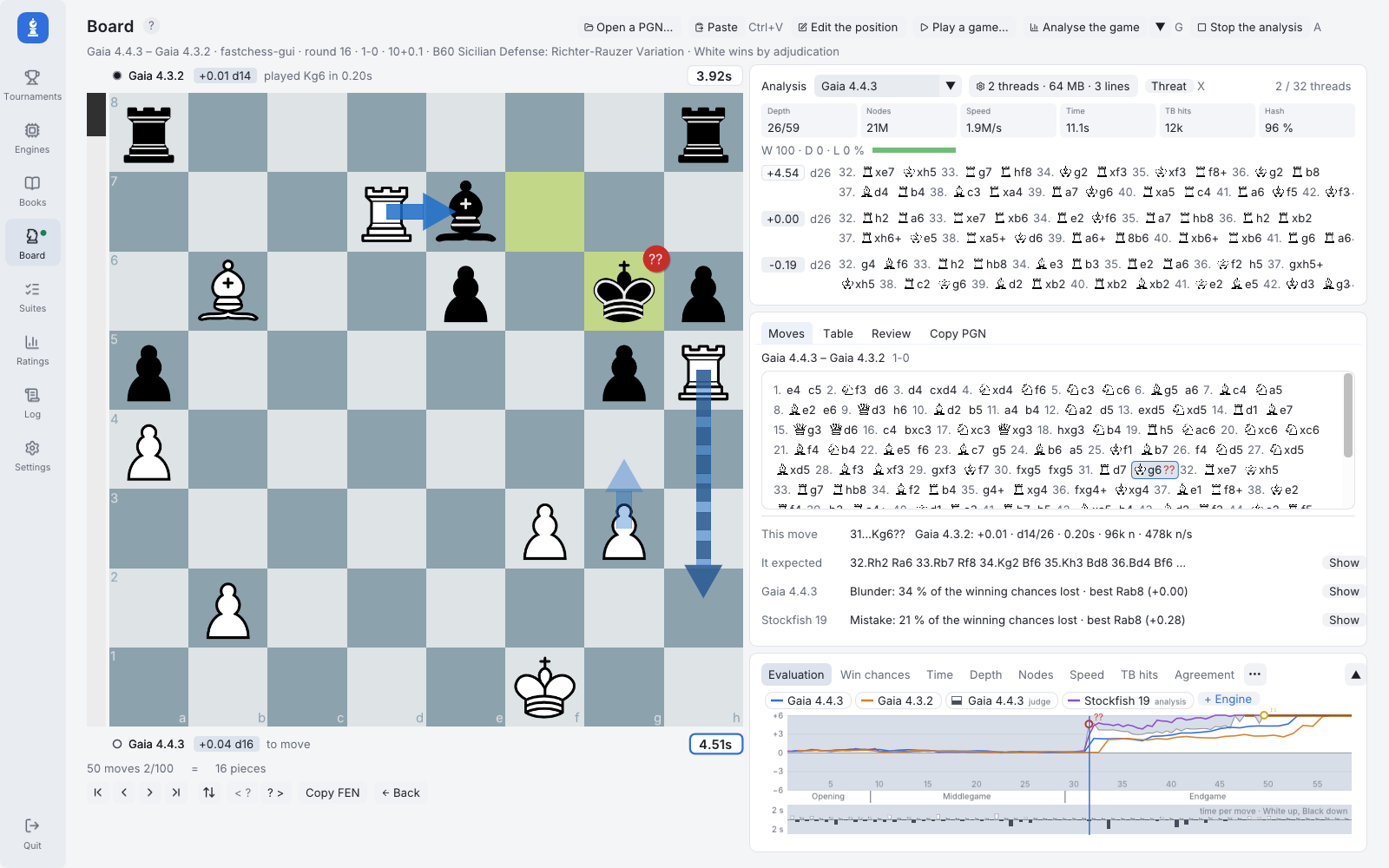
A game from a round robin of Gaia releases, analysed by Gaia 4.4.3 and Stockfish 19, at the blunder 31...Kg6??. Click any picture for full size.
For each move, the page tells what the engine that played it said, the line it expected and what each analysis thinks of it; the board shows the judgement as a badge and the expected reply as a dashed arrow, the 3D board as well. Moves you try on the board are kept as variations, and the players appear above and below the board with their clocks. A Review tab sums the game up: each side's accuracy, its mistakes, the key moments and which engine saw the turning point coming first, ready to copy as a PGN with the analysis or as BBCode for a post like this one.
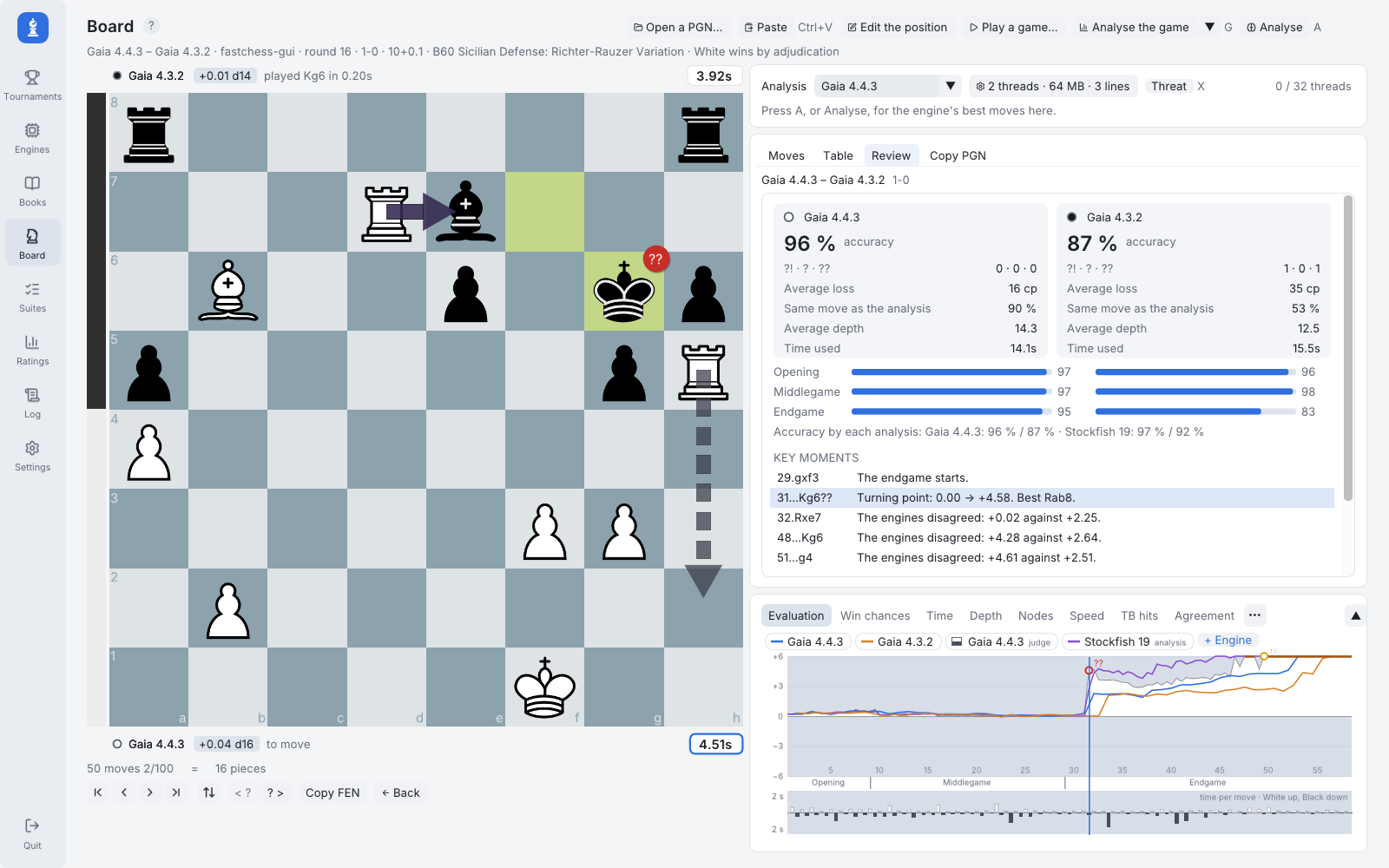
The review of the same game.
With Syzygy tablebases set up, the page also tells whether each move kept or spoiled the tablebase result. Elsewhere, a match can now give the same engine White in every game, the analysis arrows can be turned off, and the built-in guide describes all of this in its eight languages.
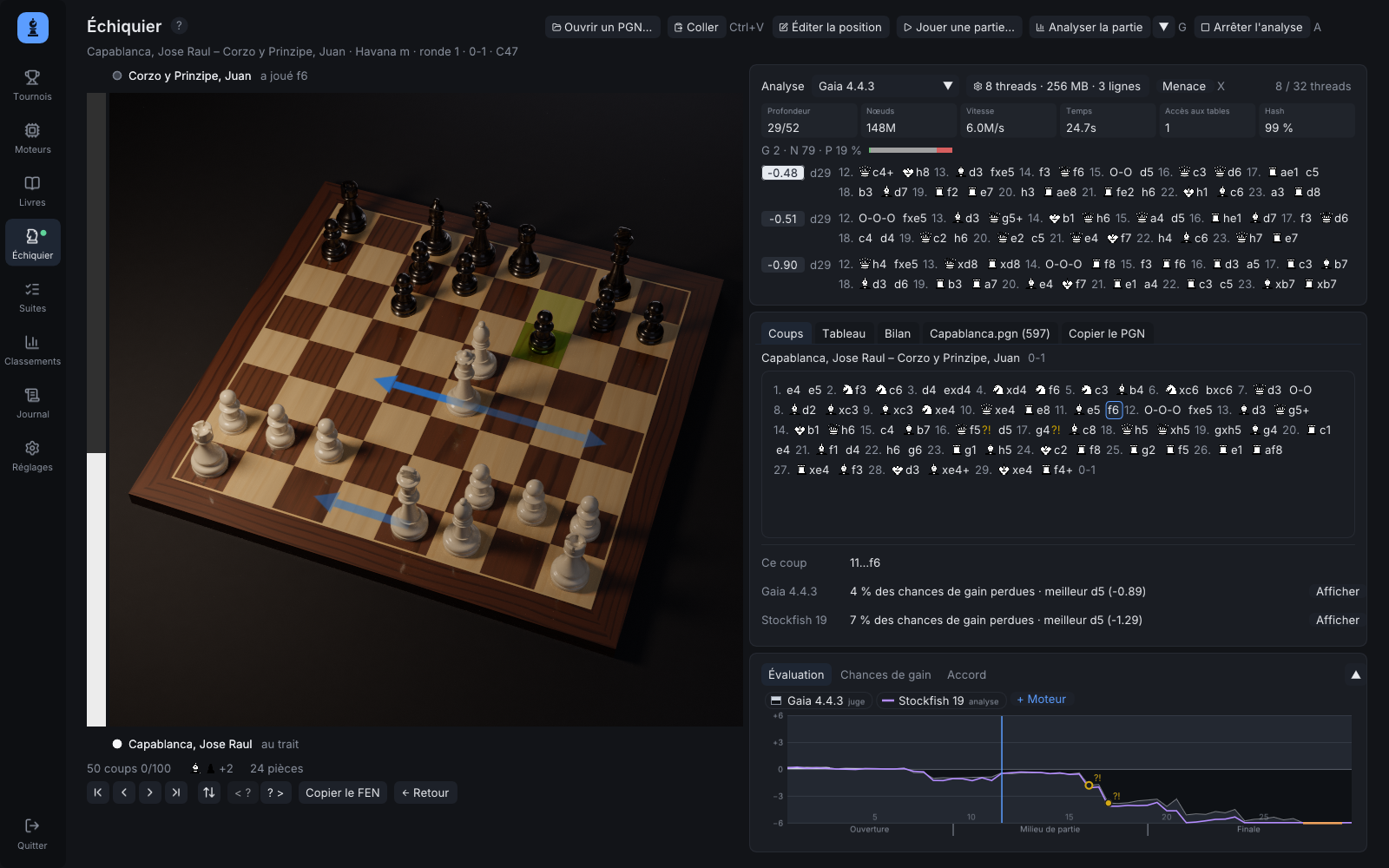
The 3D board: Capablanca against Corzo, Havana 1901, analysed by Gaia and Stockfish.
Bug reports and suggestions are welcome, here or on GitHub.
Hello everyone,
fastchess-gui 0.6.3 is out for Windows, Linux and macOS: release page. This release rebuilds the Board page so that it can read a game, from a tournament or from any PGN.
Under the moves there is now a graph of the game, with the evaluation, each engine's own curve, the marked moves, the phases and the time of each move; the Games tab and the Live view draw the same graph. Analyse the game (G) fills it in a second or two, then searches every position again, four times longer at each pass, up to the time per position you choose. It works from the last position back to the first, which, measured with Gaia and Stockfish, came about 16 % closer to long searches than going forward. Several engines can analyse the same game side by side, each with its curve.
A game from a round robin of Gaia releases, analysed by Gaia 4.4.3 and Stockfish 19, at the blunder 31...Kg6??. Click any picture for full size.
For each move, the page tells what the engine that played it said, the line it expected and what each analysis thinks of it; the board shows the judgement as a badge and the expected reply as a dashed arrow, the 3D board as well. Moves you try on the board are kept as variations, and the players appear above and below the board with their clocks. A Review tab sums the game up: each side's accuracy, its mistakes, the key moments and which engine saw the turning point coming first, ready to copy as a PGN with the analysis or as BBCode for a post like this one.
The review of the same game.
With Syzygy tablebases set up, the page also tells whether each move kept or spoiled the tablebase result. Elsewhere, a match can now give the same engine White in every game, the analysis arrows can be turned off, and the built-in guide describes all of this in its eight languages.
The 3D board: Capablanca against Corzo, Havana 1901, analysed by Gaia and Stockfish.
Bug reports and suggestions are welcome, here or on GitHub.